6 Ways Nonprofits Can Avoid Website Security Risks

Nonprofits are increasingly vulnerable to cyberattacks — and your website may be the weak link.
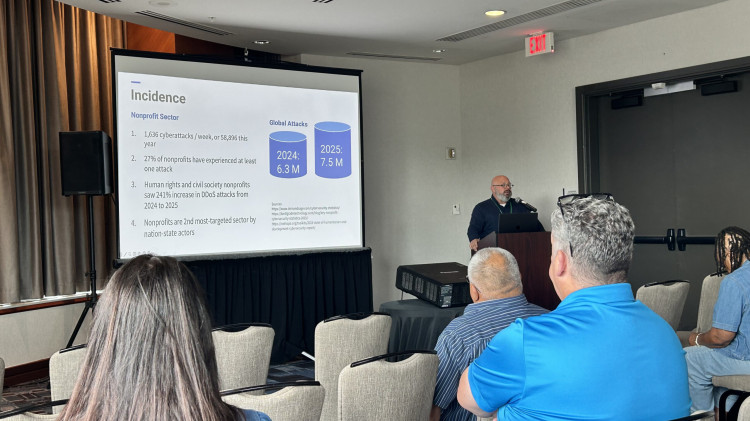
Now the second most targeted industry for cybersecurity attacks, nonprofits were only behind the energy industry, according to Okta’s “Nonprofits at Work 2025” report.
The report also found that nonprofits saw a sixfold increase in login threats year-over-year, with nearly one in every five login attempts flagged as a potential attack. Yet 32% of nonprofits lack a website security plan, and 15% don’t even use Secure Sockets Layer (SSL) certificates to secure their sites, according to the “2023 Nonprofit Tech for Good Report.”
“Nonprofits are definitely prime targets,” Marcus Iannozzi, chief digital officer at Tech Impact, a nonprofit that provides technology services to nonprofits, said. “And it’s because there’s a lot of unique risks, so bad actors often perceive nonprofits as softer targets with fewer defenses.”
Iannozzi, who presented the session “Why IT Directors Need to Care About Website Security” at his organization’s Tech Forward conference in Nashville, Tennessee, mentioned the recent trend of cybercriminals running stolen credit cards through nonprofits’ donation forms as an example. But the consequences extend far beyond website outages or IT headaches. A breach can erode donor trust, disrupt integrated platforms beyond your website and put the vulnerable individuals you serve at risk.
“When that happens, it has a very, very big impact on your reputation, [and] also public confidence,” Iannozzi said.
Here are six ways nonprofits can strengthen their defenses.
1. Treat Your Website as Core IT Infrastructure
Too often, websites fall through the cracks because they straddle two departments. Many nonprofits view their websites as marketing tools. Instead, they’re as mission-critical as your donor databases and email systems.
“Websites are actually a critical piece of your tech infrastructure,” Iannozzi said. “That sounds like an obvious statement, but again, it’s more than a marketing tool, right? It’s a critical thing that you really do need to prioritize.”
The silo problem compounds the risk. Marketing teams may control web content while IT manages infrastructure. That division of responsibility can mean no one is watching for vulnerabilities in plugins, forms and integrations. Treating the website as a true IT asset closes those gaps.
Iannozzi also urged nonprofit IT leaders to integrate website security into broader IT oversight, and even leadership and board-level discussions. Plugins, donation forms and third-party integrations must be treated with the same scrutiny as servers and email systems.
“I know that's easier said than done, especially these days, but you've got to get leadership to understand why this is an important thing to pay attention to, and the only thing you have to say to an executive director is, ‘we could lose donors,’ right? That's a really hearty argument,” he said.
2. Stay Ahead of AI-Powered Attacks
Artificial intelligence (AI) has fundamentally changed the threat landscape. Since ChatGPT’s late-2022 launch, there has been a 1,265% increase in phishing attacks, according to Forbes.
AI doesn’t just power phishing. It fuels automated scans for outdated plugins, identifies high-value data, writes custom malware and creates deepfake content to defame organizations. AI-driven bots can even mimic human behavior to bypass CAPTCHA protections and scrape donor data.
“What's new about it is how effective, quick and targeted [it is] — really it just lets these folks do more and do it better than they could on their own,” Iannozzi said.
3. Plan for the Worst With Backups, Firewalls and Response Plans
He recommended using web application firewalls, content delivery networks and logging tools to detect anomalies before they spiral. Regular penetration testing and even AI-based threat detection tools are increasingly necessary. And critically, nonprofits should develop and test an incident response plan before disaster strikes.
“A lot of nonprofits come to us — they have never backed up their site,” Iannozzi said. “... If something happens, you could lose your entire site, and if there’s no backup, you’re in trouble.”
4. Train People Like Your Mission Depends on It
The most common vulnerability isn’t technical — it’s people.
“Ninety-five percent of all breaches are caused by humans,” Iannozzi said. “They’re caused by us. We’re busy. We have lousy passwords.”
For Iannozzi, that means training cannot be optional. Staff should learn to spot phishing attempts, maintain good password hygiene and use multifactor authentication (MFA).
Nonprofits are making progress. Okta’s report found that 78% of nonprofits now use multifactor authentication, with adoption of biometrics rising and reliance on SMS codes declining.
Permissions matter too. Not everyone needs full admin access, and having layered roles with varying permissions can help in the event of a breach.
“If someone has a terrible password and their role is as a contributor and they can’t publish — if that account gets compromised, your [organization’s] exposure is not as bad because that post is never going to see the light of day,” Iannozzi said.
5. Secure Integrations, Mobile Apps and Internet-of-Things Devices
Nonprofit websites rarely operate in isolation. They are connected to donation platforms, customer relationship management (CRM) systems and event tools — and each connection can create an entry point.
“A compromised website can cascade into larger IT vulnerabilities, so it can be that front door,” Iannozzi said.
Emerging risks include Internet of Things, like printers and routers that attackers can exploit. That could be an outdated firmware or a poorly secured application programming interface (API) for that device. Mobile apps are often connected to websites via an API, allowing cybercriminals to exploit the back-end systems if there isn’t a secure API connection. Other cyberattacks could include cloning the app to direct users to phishing websites.
“So really the threat here is when you have a poorly secured device and it becomes an entry point to your network — to the network that hosts your site or anything else that thing is connected to,” Iannozzi said.
6. Keep Your Systems and Vendors in Check
Outdated or neglected content management systems are among the easiest ways in. WordPress is notorious for compromises due to its open-source plugins, Iannozzi said. Nonprofits often build their site — or outsource the process to a vendor — but don’t realize ongoing maintenance is required to keep it secure.
“You have the responsibility to monitor whenever security updates are released from the core application,” he said. “You have to monitor when security updates are released from all the plugins that you use, and you have to make sure that those updates are applied regularly. They are the No. 1 way that attackers get access to your site and will hijack it.”
Nonprofits should ensure web security is included in any vendor contracts.
“Let's say you're doing a site redesign, and you don't discuss with them your requirements for security before that site goes out the door,” Iannozzi said. “That means you're going to have to pay them later to fix something that they should have done in the first place.”
Iannozzi recalled one nonprofit whose unpatched WordPress site was compromised so badly that it could not be salvaged.
“They managed to restore a version of the site, but the backup wasn’t very recent. … We had recommended that they rebuild the site because … it was too risky for us to take that on and say, ‘OK, we’ll take responsibility for this code.’”
On the ethical end, nonprofits — not the service providers — should own their websites and platform credentials.
“We never own the hosting account for any website that we build,” Iannozzi said. “The client owns the account, and we have access so that we can support the site. … You should never purchase your hosting through your vendor because if you want to get rid of that vendor it’s sometimes very challenging.”
For nonprofits, the real cost of neglect isn’t just technical. It’s lost donations, broken trust and disrupted services to the people who depend on you most.
“It's expense. It's time. It's frustration,” Iannozzi said. “And with a little bit of oversight and good process, you can prevent it.”